

Enterprise-Ready
Designed for Fortune 500 needs – security, compliance, observability, and Azure integration out of the box.

Building Enterprise LLM Apps with .NET
.NET is Microsoft’s battle-tested framework trusted by Fortune 500 companies. It’s now easier than ever to build LLM apps. You get:
| Battle-Tested Security | Built-in identity management, secret rotation, and compliance standards |
| Production Performance | High-throughput processing with advanced memory management |
| Azure Integration | Seamless Azure OpenAI and Active Directory support |
Portkey Features
| Complete Observability | Monitor costs, latency, and performance metrics |
| Provider Flexibility | Route to 250+ LLMs (like Claude, Gemini, Llama, self-hosted etc.) without code changes |
| Smart Caching | Reduce costs & time by caching frequent requests |
| High Reliability | Automatic fallback and load balancing across providers |
| Prompt Management | Use Portkey as a centralized hub to version, experiment with prompts, and call them using a single ID |
| Continuous Improvement | Improve your app by capturing and analyzing user feedback |
| Enterprise Ready | Budget controls, rate limits, model-provisioning, and role-based access |
Supported Clients
ChatClient | ✅ Fully Supported |
EmbeddingClient | ✅ Fully Supported |
ImageClient | 🚧 Coming Soon |
BatchClient | 🚧 Coming Soon |
AudioClient | 🚧 Coming Soon |
Implementation Overview
- Install OpenAI SDK
- Create Portkey client by extending OpenAI client
- Use the client in your application to make requests
1. Install the NuGet package
Add the OpenAI NuGet package to your .NET project:dotnet add package OpenAI
2. Create Portkey Client Extension
The OpenAI package does not support directly modifying the base URL or passing additional headers. So, we write a simple function to extend OpenAI’sChatClient or EmbeddingClient to create a new PortkeyClient.
- Chat
- Embedding
using OpenAI;
using OpenAI.Chat;
using System.ClientModel;
using System.ClientModel.Primitives;

public static class PortkeyClient
{
    private class HeaderPolicy : PipelinePolicy
    {
        private readonly Dictionary<string, string> _headers;
        public HeaderPolicy(Dictionary<string, string> headers) => _headers = headers;

        public override void Process(PipelineMessage message, IReadOnlyList<PipelinePolicy> pipeline, int index)
        {
            foreach (var header in _headers) message.Request.Headers.Set(header.Key, header.Value);
            if (index < pipeline.Count) pipeline[index].Process(message, pipeline, index + 1);
        }

        public override ValueTask ProcessAsync(PipelineMessage message, IReadOnlyList<PipelinePolicy> pipeline, int index)
        {
            Process(message, pipeline, index);
            return ValueTask.CompletedTask;
        }
    }

    public static OpenAIClient CreateClient(Dictionary<string, string> headers)
    {
        var options = new OpenAIClientOptions { Endpoint = new Uri("https://api.portkey.ai/v1") };
        options.AddPolicy(new HeaderPolicy(headers), PipelinePosition.PerCall);
        return new OpenAIClient(new ApiKeyCredential("dummy"), options);
    }

    public static ChatClient CreateChatClient(Dictionary<string, string> headers, string model)
    {
        var client = CreateClient(headers);
        return client.GetChatClient(model);
    }
}
using OpenAI;
using OpenAI.Embeddings;
using System.ClientModel;
using System.ClientModel.Primitives;

public static class PortkeyClient
{
    private class HeaderPolicy : PipelinePolicy
    {
        private readonly Dictionary<string, string> _headers;
        public HeaderPolicy(Dictionary<string, string> headers) => _headers = headers;

        public override void Process(PipelineMessage message, IReadOnlyList<PipelinePolicy> pipeline, int index)
        {
            foreach (var header in _headers) message.Request.Headers.Set(header.Key, header.Value);
            if (index < pipeline.Count) pipeline[index].Process(message, pipeline, index + 1);
        }

        public override ValueTask ProcessAsync(PipelineMessage message, IReadOnlyList<PipelinePolicy> pipeline, int index)
        {
            Process(message, pipeline, index);
            return ValueTask.CompletedTask;
        }
    }

    public static EmbeddingClient CreateEmbeddingClient(Dictionary<string, string> headers, string model)
    {
        var options = new OpenAIClientOptions { Endpoint = new Uri("https://api.portkey.ai/v1") };
        options.AddPolicy(new HeaderPolicy(headers), PipelinePosition.PerCall);
        return new OpenAIClient(new ApiKeyCredential("dummy"), options).GetEmbeddingClient(model);
    }
}
3. Use the Portkey Client
After creating the extension above, you can pass any Portkey supported headers directly while creating the new client.- Chat
- Embedding
// Define Portkey headers
var headers = new Dictionary<string, string> {
    // Required headers
    { "x-portkey-api-key", "..." },           // Your Portkey API key
    { "x-portkey-provider", "@openai-prod" }, // Provider slug from Model Catalog

    // Optional headers
    { "x-portkey-trace-id", "my-app" },       // Custom trace identifier
    { "x-portkey-config", "..." },            // Send Config ID
    // Add any other Portkey headers as needed
};

// Create client
var client = PortkeyClient.CreateChatClient(
    headers: headers,
    model: "gpt-4o"
);

// Make request
var response = client.CompleteChat(new UserChatMessage("Hello!"));
Console.WriteLine(response.Value.Content[0].Text);
Add providers in the Model Catalog to get a provider slug (e.g.,
@openai-prod). The legacy x-portkey-virtual-key header is still supported.// Define Portkey headers
var headers = new Dictionary<string, string> {
// Required headers
{ "x-portkey-api-key", "..." }, // Your Portkey API key
{ "x-portkey-provider", "@openai-prod" }, // Provider slug from Model Catalog
// Optional headers
{ "x-portkey-trace-id", "..." }, // Custom trace identifier
{ "x-portkey-config", "..." }, // Send Config ID
// Add any other Portkey headers as needed
};
// Create embedding client through Portkey
var client = PortkeyClient.CreateEmbeddingClient(
headers: headers,
model: "text-embedding-3-large"
);
// Text that we want to embed
string description = "Best hotel in town if you like luxury hotels. They have an amazing infinity pool, a spa,"
+ " and a really helpful concierge. The location is perfect -- right downtown, close to all the tourist"
+ " attractions. We highly recommend this hotel.";
// Generate embedding
var embeddingResult = client.GenerateEmbedding(description);
var vector = embeddingResult.Value.ToFloats();
Console.WriteLine($"Full embedding dimensions: {vector.Length}");
While we show common headers here, you can pass any Portkey-supported headers to enable features like custom metadata, fallbacks, caching, retries, and more.
4. View Your Request in Portkey Logs
This request will now be logged on Portkey: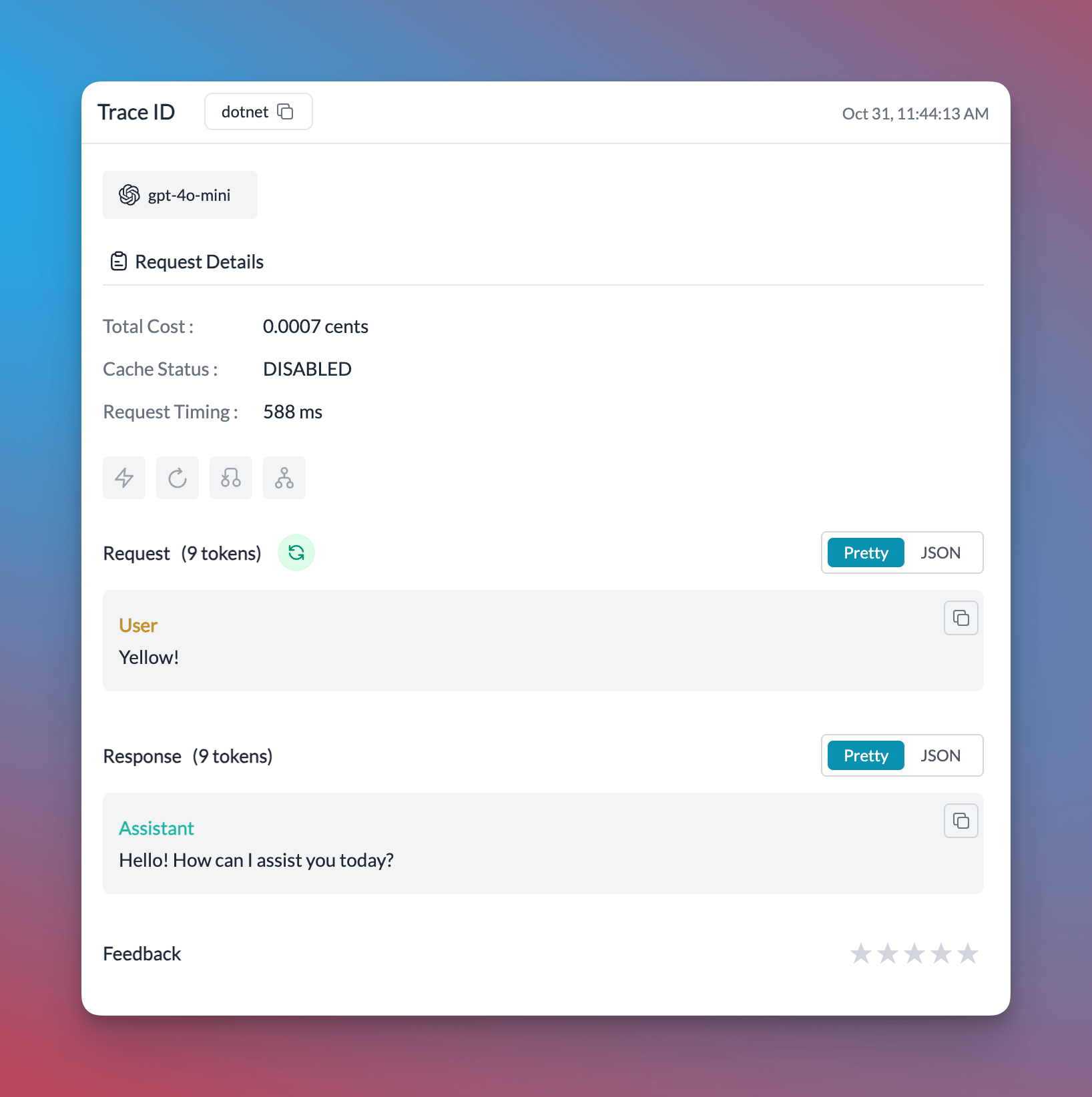
Chat Completions Example
Add your Azure OpenAI details in the Model Catalog to get a provider slug.using OpenAI;
using OpenAI.Chat;
using System.ClientModel;
using System.ClientModel.Primitives;
public static class Portkey
{
private class HeaderPolicy : PipelinePolicy
{
private readonly Dictionary<string, string> _headers;
public HeaderPolicy(Dictionary<string, string> headers) => _headers = headers;
public override void Process(PipelineMessage message, IReadOnlyList<PipelinePolicy> pipeline, int index)
{
foreach (var header in _headers) message.Request.Headers.Set(header.Key, header.Value);
if (index < pipeline.Count) pipeline[index].Process(message, pipeline, index + 1);
}
public override ValueTask ProcessAsync(PipelineMessage message, IReadOnlyList<PipelinePolicy> pipeline, int index)
{
Process(message, pipeline, index);
return ValueTask.CompletedTask;
}
}
public static ChatClient CreateChatClient(Dictionary<string, string> headers, string model)
{
var options = new OpenAIClientOptions { Endpoint = new Uri("https://api.portkey.ai/v1") };
options.AddPolicy(new HeaderPolicy(headers), PipelinePosition.PerCall);
return new OpenAIClient(new ApiKeyCredential("dummy"), options).GetChatClient(model);
}
}
public class Program
{
public static void Main()
{
var client = Portkey.CreateChatClient(
headers: new Dictionary<string, string> {
{ "x-portkey-api-key", "PORTKEY API KEY" },
{ "x-portkey-provider", "@azure-openai-prod" }, // Provider slug from Model Catalog
{ "x-portkey-trace-id", "dotnet" }
},
model: "gpt-4o" // Model name configured in your Azure deployment
);
Console.WriteLine(client.CompleteChat(new UserChatMessage("1729")).Value.Content[0].Text);
}
}
Embedding Example
using OpenAI;
using OpenAI.Embeddings;
using System.ClientModel;
using System.ClientModel.Primitives;
public static class PortkeyClient
{
private class HeaderPolicy : PipelinePolicy
{
private readonly Dictionary<string, string> _headers;
public HeaderPolicy(Dictionary<string, string> headers) => _headers = headers;
public override void Process(PipelineMessage message, IReadOnlyList<PipelinePolicy> pipeline, int index)
{
foreach (var header in _headers) message.Request.Headers.Set(header.Key, header.Value);
if (index < pipeline.Count) pipeline[index].Process(message, pipeline, index + 1);
}
public override ValueTask ProcessAsync(PipelineMessage message, IReadOnlyList<PipelinePolicy> pipeline, int index)
{
Process(message, pipeline, index);
return ValueTask.CompletedTask;
}
}
public static EmbeddingClient CreateEmbeddingClient(Dictionary<string, string> headers, string model)
{
var options = new OpenAIClientOptions { Endpoint = new Uri("https://api.portkey.ai/v1") };
options.AddPolicy(new HeaderPolicy(headers), PipelinePosition.PerCall);
return new OpenAIClient(new ApiKeyCredential("dummy"), options).GetEmbeddingClient(model);
}
}
class Program
{
static void Main()
{
// Define Portkey headers
var headers = new Dictionary<string, string> {
    // Required headers
    { "x-portkey-api-key", "..." },           // Your Portkey API key
    { "x-portkey-provider", "@openai-prod" }, // Provider slug from Model Catalog

    // Optional headers
    { "x-portkey-trace-id", "..." },          // Custom trace identifier
    { "x-portkey-config", "..." },            // Send Config ID
    // Add any other Portkey headers as needed
};

// Create embedding client through Portkey
var client = PortkeyClient.CreateEmbeddingClient(
    headers: headers,
    model: "text-embedding-3-large"
);

// Text that we want to embed
string description = "Best hotel in town if you like luxury hotels. They have an amazing infinity pool, a spa,"
    + " and a really helpful concierge. The location is perfect -- right downtown, close to all the tourist"
    + " attractions. We highly recommend this hotel.";

// Generate embedding
var embeddingResult = client.GenerateEmbedding(description);
var vector = embeddingResult.Value.ToFloats();

Console.WriteLine($"Full embedding dimensions: {vector.Length}");
}
}
Microsoft Semantic Kernel Example
We can make use of the Portkey client we created above to initialize the Semantic Kernel. (Please make use of theCreateClient method and not CreateChatClient method to create the client)
using Microsoft.SemanticKernel;
using Microsoft.SemanticKernel.ChatCompletion;

public class Program
{
    public static async Task Main()
    {
        var headers = new Dictionary<string, string> {
            // Required headers
            { "x-portkey-api-key", "..." },           // Your Portkey API key
            { "x-portkey-provider", "@openai-prod" }, // Provider slug from Model Catalog

            // Optional headers
            // { "x-portkey-trace-id", "my-app" },    // Custom trace identifier
            // { "x-portkey-config", "..." },         // Send Config ID
            // Add any other Portkey headers as needed
        };

        // Create client
        var client = PortkeyClient.CreateClient(headers);

        var builder = Kernel.CreateBuilder().AddOpenAIChatCompletion("gpt-4", client);
        Kernel kernel = builder.Build();
        var chatCompletionService = kernel.GetRequiredService<IChatCompletionService>();

        var history = new ChatHistory();

        // Initiate a back-and-forth chat
        string? userInput;
        do {
            // Collect user input
            Console.Write("User > ");
            userInput = Console.ReadLine();

            // Add user input
            history.AddUserMessage(userInput);

            // Get the response from the AI
            var result = await chatCompletionService.GetChatMessageContentAsync(
                history,
                null,
                kernel: kernel);

            // Print the results
            Console.WriteLine("Assistant > " + result);

            // Add the message from the agent to the chat history
            history.AddMessage(result.Role, result.Content ?? string.Empty);
        } while (userInput is not null);
    }
}
More Features
- Async Usage
- Multi-Turn Conversation
- Call Anthropic Models
- Call Vertex Models
You can also use the
PortkeyClient to send Async requests:var completion = await client.CompleteChatAsync(new UserChatMessage("Hello!"));
Console.WriteLine(completion.Value.Content[0].Text);
Use the
SystemChatMessage and UserChatMessage properties from the OpenAI package to create multi-turn conversations:var messages = new List<ChatMessage>
{
new SystemChatMessage("You are a helpful assistant."),
new UserChatMessage("What is the capital of France?")
};
var completion = client.CompleteChat(messages);
messages.Add(new AssistantChatMessage(completion));
Switching providers is just a matter of changing your AI Provider slug. Change it to Anthropic, set the model name, and start making requests to Anthropic from the OpenAI .NET library.
using OpenAI;
using OpenAI.Chat;
using System.ClientModel;
using System.ClientModel.Primitives;

public static class Portkey
{
    private class HeaderPolicy : PipelinePolicy
    {
        private readonly Dictionary<string, string> _headers;
        public HeaderPolicy(Dictionary<string, string> headers) => _headers = headers;

        public override void Process(PipelineMessage message, IReadOnlyList<PipelinePolicy> pipeline, int index)
        {
            foreach (var header in _headers) message.Request.Headers.Set(header.Key, header.Value);
            if (index < pipeline.Count) pipeline[index].Process(message, pipeline, index + 1);
        }

        public override ValueTask ProcessAsync(PipelineMessage message, IReadOnlyList<PipelinePolicy> pipeline, int index)
        {
            Process(message, pipeline, index);
            return ValueTask.CompletedTask;
        }
    }

    public static ChatClient CreateChatClient(Dictionary<string, string> headers, string model)
    {
        var options = new OpenAIClientOptions { Endpoint = new Uri("https://api.portkey.ai/v1") };
        options.AddPolicy(new HeaderPolicy(headers), PipelinePosition.PerCall);
        return new OpenAIClient(new ApiKeyCredential("dummy"), options).GetChatClient(model);
    }
}

public class Program
{
    public static void Main()
    {
        var client = Portkey.CreateChatClient(
            headers: new Dictionary<string, string> {
                { "x-portkey-api-key", "PORTKEY API KEY" },
                { "x-portkey-provider", "@anthropic-prod" }, // Provider slug from Model Catalog
                { "x-portkey-trace-id", "dotnet" }
            },
            model: "claude-sonnet-4-20250514"
        );

        Console.WriteLine(client.CompleteChat(new UserChatMessage("1729")).Value.Content[0].Text);
    }
}
Similarly, just change your provider to the Vertex AI Provider:
using OpenAI;
using OpenAI.Chat;
using System.ClientModel;
using System.ClientModel.Primitives;

public static class Portkey
{
    private class HeaderPolicy : PipelinePolicy
    {
        private readonly Dictionary<string, string> _headers;
        public HeaderPolicy(Dictionary<string, string> headers) => _headers = headers;

        public override void Process(PipelineMessage message, IReadOnlyList<PipelinePolicy> pipeline, int index)
        {
            foreach (var header in _headers) message.Request.Headers.Set(header.Key, header.Value);
            if (index < pipeline.Count) pipeline[index].Process(message, pipeline, index + 1);
        }

        public override ValueTask ProcessAsync(PipelineMessage message, IReadOnlyList<PipelinePolicy> pipeline, int index)
        {
            Process(message, pipeline, index);
            return ValueTask.CompletedTask;
        }
    }

    public static ChatClient CreateChatClient(Dictionary<string, string> headers, string model)
    {
        var options = new OpenAIClientOptions { Endpoint = new Uri("https://api.portkey.ai/v1") };
        options.AddPolicy(new HeaderPolicy(headers), PipelinePosition.PerCall);
        return new OpenAIClient(new ApiKeyCredential("dummy"), options).GetChatClient(model);
    }
}

public class Program
{
    public static void Main()
    {
        var client = Portkey.CreateChatClient(
            headers: new Dictionary<string, string> {
                { "x-portkey-api-key", "PORTKEY API KEY" },
                { "x-portkey-provider", "@vertex-ai-prod" }, // Provider slug from Model Catalog
                { "x-portkey-trace-id", "dotnet" }
            },
            model: "gemini-2.0-flash"
        );

        Console.WriteLine(client.CompleteChat(new UserChatMessage("1729")).Value.Content[0].Text);
    }
}
Next Steps
- Call local models
- Enable cache
- Setup fallbacks
- Loadbalance requests against multiple instances
- Append metadata with requests