

This guide covers Langchain Python. For JS, see Langchain JS.
ChatOpenAI to effortlessly work with 1600+ LLMs (Anthropic, Gemini, Mistral, etc.) without needing different SDKs. Portkey enhances your Langchain apps with interoperability, reliability, speed, cost-efficiency, and deep observability.
Getting Started
Integrate Portkey into Langchain easily.1. Install Packages
langchain-openai includes langchain-core. Install langchain or other specific packages if you need more components.2. Basic Setup: ChatOpenAI with Portkey
Configure ChatOpenAI to route requests via Portkey using your Portkey API Key and createHeaders method.
ChatOpenAI Parameters:
api_key: The underlying provider’s API key.base_url: Set toPORTKEY_GATEWAY_URLto route via Portkey.default_headers: UsescreateHeadersfor yourPORTKEY_API_KEY. Can also include avirtual_key(for provider credentials) or aconfigID (for advanced routing).
llm instance now use Portkey, starting with observability.
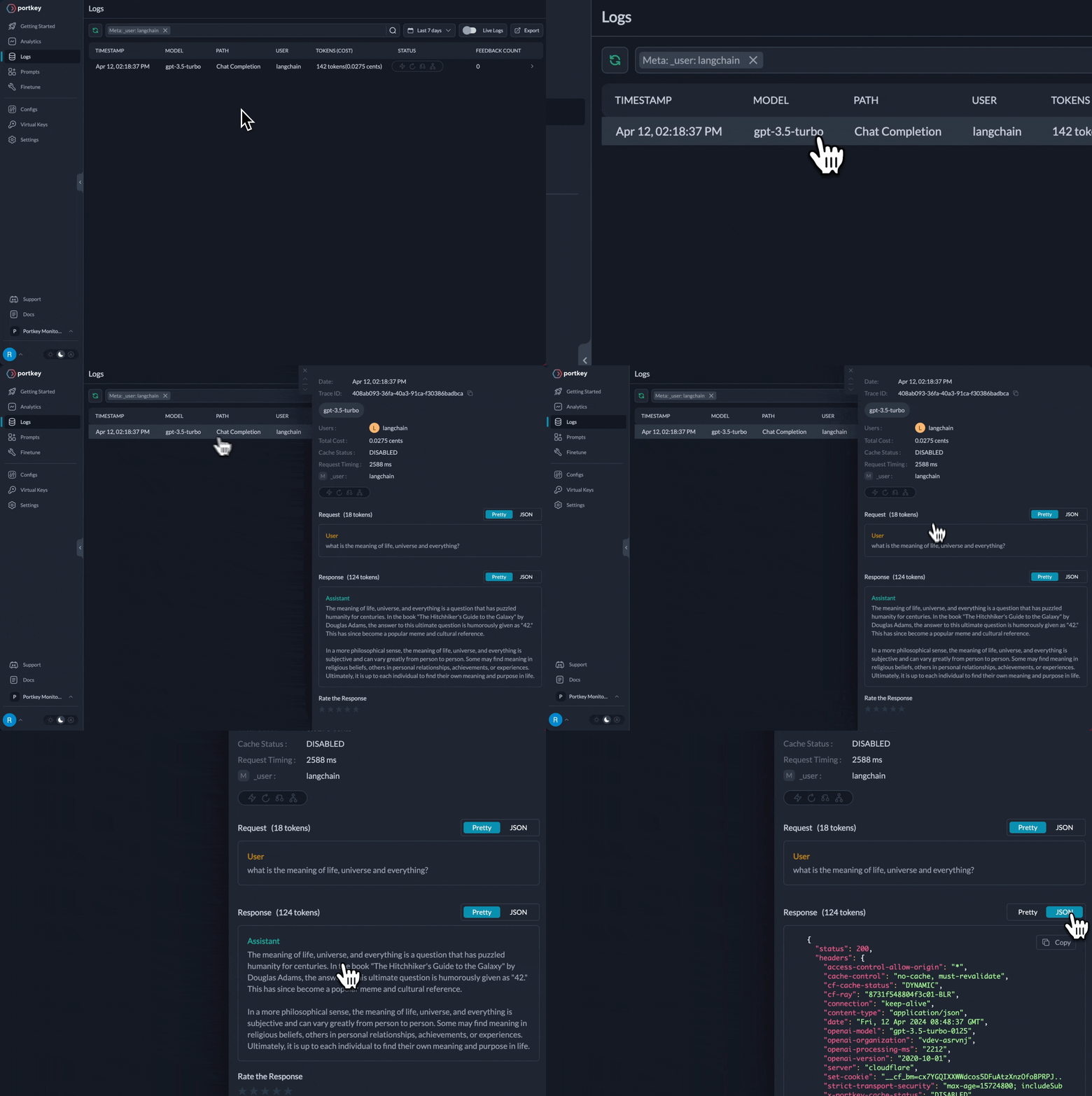
Langchain requests now appear in Portkey Logs
Key Portkey Features for Langchain
Routing Langchain requests via Portkey’sChatOpenAI interface unlocks powerful capabilities:
Multi-LLM Integration
Use ChatOpenAI for OpenAI, Anthropic, Gemini, Mistral, and more. Switch providers easily with Virtual Keys or Configs.
Advanced Caching
Reduce latency and costs with Portkey’s Simple, Semantic, or Hybrid caching, enabled via Configs.
Enhanced Reliability
Build robust apps with retries, timeouts, fallbacks, and load balancing, configured in Portkey.
Full Observability
Get deep insights: LLM usage, costs, latency, and errors are automatically logged in Portkey.
Prompt Management
Manage, version, and use prompts from Portkey’s Prompt Library within Langchain.
Secure Virtual Keys
Securely manage LLM provider API keys using Portkey Virtual Keys in your Langchain setup.
1. Multi-LLM Integration
Portkey simplifies using different LLM providers.ChatOpenAI becomes your universal client for numerous models.
Mechanism: Portkey Headers with Virtual Keys
Switch LLMs by changing the virtual_key in createHeaders and the model in ChatOpenAI. Portkey manages provider specifics.
Example: Anthropic (Claude)
- Create Anthropic Virtual Key: In Portkey, add your Anthropic API key and get the Virtual Key ID.
- Update Langchain code:
Example: Vertex (Gemini)
- Create Google Virtual Key: In Portkey, add your Vertex AI credentials and get the Virtual Key ID.
- Update Langchain code:
ChatOpenAI structure remains. Only virtual_key and model change. Portkey maps responses to the OpenAI format Langchain expects. This extends to Mistral, Cohere, Azure, Bedrock via their Virtual Keys.
2. Advanced Caching
Portkey’s caching reduces latency and LLM costs. Enable it via a Portkey Config object or a saved Config ID increateHeaders.
A Portkey Config can specify mode (simple, semantic, hybrid) and max_age (cache duration).
Example: Semantic Caching
-
Define/Save Portkey Config: Create a Config in Portkey (e.g.,
langchain-semantic-cache) specifying caching strategy.Assume saved Config ID iscfg_semantic_cache_123. -
Use Config ID in
createHeaders:
3. Enhanced Reliability
Portkey improves Langchain app resilience via Configs:- Retries: Auto-retry failed LLM requests.
- Fallbacks: Define backup LLMs if a primary fails.
- Load Balancing: Distribute requests across keys or models.
- Timeouts: Set max request durations.
Example: Fallbacks with Retries
-
Define/Save Portkey Config: Create a Config for retries and fallbacks (e.g.,
gpt-4othenclaude-3-sonnet).Assume saved Config ID iscfg_reliable_123. -
Use Config ID in
createHeaders:
4. Full Observability
Routing LangchainChatOpenAI via Portkey provides instant, comprehensive observability:
- Logged Requests: Detailed logs of requests, responses, latencies, costs.
- Tracing: Understand call lifecycles.
- Performance Analytics: Monitor metrics, track usage.
- Debugging: Pinpoint errors quickly.
Langchain requests are automatically logged in Portkey
5. Prompt Management
Portkey’s Prompt Library helps manage prompts effectively:- Version Control: Store and track prompt changes.
- Parameterized Prompts: Use variables with mustache templating.
- Sandbox: Test prompts with different LLMs in Portkey.
Using Portkey Prompts in Langchain
- Create prompt in Portkey, get
Prompt ID. - Use Portkey SDK to render prompt with variables.
- Transform rendered prompt to Langchain message format.
- Pass messages to Portkey-configured
ChatOpenAI.
6. Secure Virtual Keys
Portkey’s Virtual Keys are vital for secure, flexible LLM ops with Langchain. Benefits:- Secure Credentials: Store provider API keys in Portkey’s vault. Code uses Virtual Key IDs.
- Easy Configuration: Switch providers/keys by changing
virtual_keyincreateHeaders. - Access Control: Manage Virtual Key permissions in Portkey.
- Auditability: Track usage via Portkey logs.
Langchain Embeddings
Create embeddings withOpenAIEmbeddings via Portkey.
Portkey supports OpenAI embeddings via Langchain’s
OpenAIEmbeddings. For other providers (Cohere, Gemini), use the Portkey SDK directly (docs).Langchain Chains & Prompts
Standard LangchainChains and PromptTemplates work seamlessly with Portkey-configured ChatOpenAI instances. Portkey features (logging, caching) apply automatically.
chat_llm are processed by Portkey.
This concludes the main features. Redundant examples have been removed for clarity.